Diese Website verwendet Cookies. Klicken Sie auf „Accept“ (Annehmen), wenn Sie der Verwendung von Cookies auf unserer Webseite zustimmen, wie in unserer Datenschutzrichtlinie beschrieben. Klicken Sie auf Präferenzen, um Ihre Cookie-Einstellungen anzupassen.
Unsere Community nutzt SingleKey ID!
Du kannst eine neue SingleKey ID erstellen oder dich mit deiner bestehenden SingleKey ID (ehemals Bosch ID) registrieren bzw. anmelden.
Ein Login für viele Marken
Vorschläge aktivieren
Mit der automatischen Vorschlagsfunktion können Sie Ihre Suchergebnisse eingrenzen, da während der Eingabe mögliche Treffer angezeigt werden.
- Bosch Smart Home Community
- SMART Talk
- Funktionen und Nutzung
- Motion detector no longer reachable
Optionen
- RSS-Feed abonnieren
- Thema als neu kennzeichnen
- Thema als gelesen kennzeichnen
- Diesen Thema für mich anpinnen
- Lesezeichen
- Abonnieren
- Stummschalten
- Drucker-Anzeigeseite
Motion detector no longer reachable

Optionen
- Als neu kennzeichnen
- Lesezeichen
- Abonnieren
- Stummschalten
- RSS-Feed abonnieren
- Direktlink zum Kommentar
- Per E-Mail an einen Freund senden
- Anstößigen Inhalt melden
04. August 2025 10:57 - bearbeitet 04. August 2025 11:21
Hello,
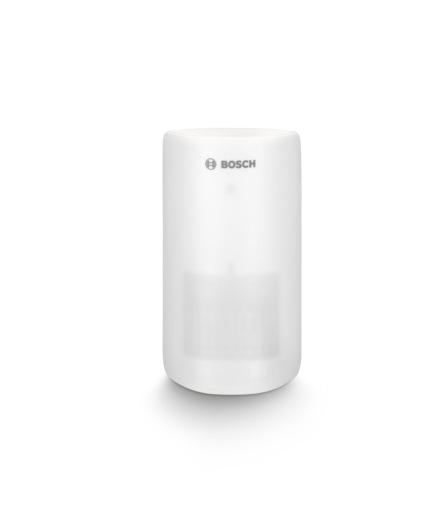
few weeks ago (can't say if it's related to 10.28/10.29 updates or not, but that's when I noticed it), my Motion detector is no longer reachable by the Android app. The device was at this time flashing red (once every .. minute?), reported on the Android app as "cannot be reached". The batteries are OK and the device is in range.
I tried to delete it/re-add it, but I get:
Error
It was not possible to access the network
Since it's no longer possible to delete it, I tried to reset it -> now it's flashing orange every 10sec then red. Another reset attempt led it to be flashing orange indifinitely.
This not-reachable status is exactly what I get from another device at https://community.bosch-smarthome.com/t5/funktionen-und-nutzung/universal-switch-ii-compatibility-wi..., maybe for other reasons, but I wonder if the cause is not at firmware now.
The controller (v1) has been changed meanwhile, but I still face the same issue with the motion detector.
Any clue or hint?
Beschriftungen:
- Themenübersicht:
-
Bewegungsmelder
10 ANTWORTEN 10

Optionen
- Als neu kennzeichnen
- Lesezeichen
- Abonnieren
- Stummschalten
- RSS-Feed abonnieren
- Direktlink zum Kommentar
- Per E-Mail an einen Freund senden
- Anstößigen Inhalt melden
am 04. August 2025 16:17
@kukrapok it seems that we could reset was not correct. Here you will find the correct steps for the reset.
Ich antworte hier als privater Nutzer und als von Bosch Smart Home benannter Poweruser. Ich bin weder Bosch SmartHome, noch Robert Bosch Mitarbeiter.
SHC II mit Funkstick und 64 Geräten (Gen I und II) seit 09.04.2017, Security+, Home+ (incl. Cloud+ und Audio+), praktisch alle Gerätetypen, 3 Kameras (Außen I und II, Innen II), Yale Linus 1 und 2, Hue-Bridge und Home-Assistent. APC-USV für Router und Controller, 10 Automationen.
iPhone 17 Pro und iPad Pro M4 11“ mit iOS 27 und iPadOS 27, HomePod als Matterzentrale, Telekom Glasfaser mit Fritz!Box 5690 Pro und Mesh
☝ gerne mitmachen! Info SHC Generation, Smartphone und Betriebssystem hilft häufig bei der Lösung von Problemen. Einfach im Profil bei "Persönliche Informationen" in der "Signatur" eintragen.
SHC II mit Funkstick und 64 Geräten (Gen I und II) seit 09.04.2017, Security+, Home+ (incl. Cloud+ und Audio+), praktisch alle Gerätetypen, 3 Kameras (Außen I und II, Innen II), Yale Linus 1 und 2, Hue-Bridge und Home-Assistent. APC-USV für Router und Controller, 10 Automationen.
iPhone 17 Pro und iPad Pro M4 11“ mit iOS 27 und iPadOS 27, HomePod als Matterzentrale, Telekom Glasfaser mit Fritz!Box 5690 Pro und Mesh
☝ gerne mitmachen! Info SHC Generation, Smartphone und Betriebssystem hilft häufig bei der Lösung von Problemen. Einfach im Profil bei "Persönliche Informationen" in der "Signatur" eintragen.
Optionen
- Als neu kennzeichnen
- Lesezeichen
- Abonnieren
- Stummschalten
- RSS-Feed abonnieren
- Direktlink zum Kommentar
- Per E-Mail an einen Freund senden
- Anstößigen Inhalt melden
am 05. August 2025 00:00
I followed the reset procedure described here: https://www.youtube.com/watch?v=rEgb-Jv0C8M
I got the exact same LED color sequence, but at the end, it's flashing orange every 10 sec.
Optionen
- Als neu kennzeichnen
- Lesezeichen
- Abonnieren
- Stummschalten
- RSS-Feed abonnieren
- Direktlink zum Kommentar
- Per E-Mail an einen Freund senden
- Anstößigen Inhalt melden
05. August 2025 07:51 - bearbeitet 05. August 2025 07:51
@kukrapok that shows that the Bewegungsmelder is not connected to the controller. If Zoe seething a device, you have to delete it in the BSH app as well. Otherwise you can not connect it again.
Ich antworte hier als privater Nutzer und als von Bosch Smart Home benannter Poweruser. Ich bin weder Bosch SmartHome, noch Robert Bosch Mitarbeiter.
SHC II mit Funkstick und 64 Geräten (Gen I und II) seit 09.04.2017, Security+, Home+ (incl. Cloud+ und Audio+), praktisch alle Gerätetypen, 3 Kameras (Außen I und II, Innen II), Yale Linus 1 und 2, Hue-Bridge und Home-Assistent. APC-USV für Router und Controller, 10 Automationen.
iPhone 17 Pro und iPad Pro M4 11“ mit iOS 27 und iPadOS 27, HomePod als Matterzentrale, Telekom Glasfaser mit Fritz!Box 5690 Pro und Mesh
☝ gerne mitmachen! Info SHC Generation, Smartphone und Betriebssystem hilft häufig bei der Lösung von Problemen. Einfach im Profil bei "Persönliche Informationen" in der "Signatur" eintragen.
SHC II mit Funkstick und 64 Geräten (Gen I und II) seit 09.04.2017, Security+, Home+ (incl. Cloud+ und Audio+), praktisch alle Gerätetypen, 3 Kameras (Außen I und II, Innen II), Yale Linus 1 und 2, Hue-Bridge und Home-Assistent. APC-USV für Router und Controller, 10 Automationen.
iPhone 17 Pro und iPad Pro M4 11“ mit iOS 27 und iPadOS 27, HomePod als Matterzentrale, Telekom Glasfaser mit Fritz!Box 5690 Pro und Mesh
☝ gerne mitmachen! Info SHC Generation, Smartphone und Betriebssystem hilft häufig bei der Lösung von Problemen. Einfach im Profil bei "Persönliche Informationen" in der "Signatur" eintragen.
Optionen
- Als neu kennzeichnen
- Lesezeichen
- Abonnieren
- Stummschalten
- RSS-Feed abonnieren
- Direktlink zum Kommentar
- Per E-Mail an einen Freund senden
- Anstößigen Inhalt melden
am 05. August 2025 09:00
OK. Excepted that.. the app cannot delete a device when it cannot communicate with it. Not well-designed :-/.
Optionen
- Als neu kennzeichnen
- Lesezeichen
- Abonnieren
- Stummschalten
- RSS-Feed abonnieren
- Direktlink zum Kommentar
- Per E-Mail an einen Freund senden
- Anstößigen Inhalt melden
am 05. August 2025 09:12
@kukrapok that would not make any sense. Otherwise a device will bei automatically deleted, if i.e. 🔋 are empty.
Ich antworte hier als privater Nutzer und als von Bosch Smart Home benannter Poweruser. Ich bin weder Bosch SmartHome, noch Robert Bosch Mitarbeiter.
SHC II mit Funkstick und 64 Geräten (Gen I und II) seit 09.04.2017, Security+, Home+ (incl. Cloud+ und Audio+), praktisch alle Gerätetypen, 3 Kameras (Außen I und II, Innen II), Yale Linus 1 und 2, Hue-Bridge und Home-Assistent. APC-USV für Router und Controller, 10 Automationen.
iPhone 17 Pro und iPad Pro M4 11“ mit iOS 27 und iPadOS 27, HomePod als Matterzentrale, Telekom Glasfaser mit Fritz!Box 5690 Pro und Mesh
☝ gerne mitmachen! Info SHC Generation, Smartphone und Betriebssystem hilft häufig bei der Lösung von Problemen. Einfach im Profil bei "Persönliche Informationen" in der "Signatur" eintragen.
SHC II mit Funkstick und 64 Geräten (Gen I und II) seit 09.04.2017, Security+, Home+ (incl. Cloud+ und Audio+), praktisch alle Gerätetypen, 3 Kameras (Außen I und II, Innen II), Yale Linus 1 und 2, Hue-Bridge und Home-Assistent. APC-USV für Router und Controller, 10 Automationen.
iPhone 17 Pro und iPad Pro M4 11“ mit iOS 27 und iPadOS 27, HomePod als Matterzentrale, Telekom Glasfaser mit Fritz!Box 5690 Pro und Mesh
☝ gerne mitmachen! Info SHC Generation, Smartphone und Betriebssystem hilft häufig bei der Lösung von Problemen. Einfach im Profil bei "Persönliche Informationen" in der "Signatur" eintragen.
Optionen
- Als neu kennzeichnen
- Lesezeichen
- Abonnieren
- Stummschalten
- RSS-Feed abonnieren
- Direktlink zum Kommentar
- Per E-Mail an einen Freund senden
- Anstößigen Inhalt melden
05. August 2025 09:21 - bearbeitet 05. August 2025 10:30
Of course it does not make any sense, that's why I say it's badly designed (and buggy).
Here is what I get when I try to remove a device when the app is not able to communicate with it (same case in the other forum post I mentioned in the first post here):
Error
It was not possible to access the network.
Screenshot:


Optionen
- Als neu kennzeichnen
- Lesezeichen
- Abonnieren
- Stummschalten
- RSS-Feed abonnieren
- Direktlink zum Kommentar
- Per E-Mail an einen Freund senden
- Anstößigen Inhalt melden
am 05. August 2025 13:49
Hi @kukrapok , please contact our support:
https://www.bosch-smarthome.com/de/de/support/
Best regards
SmartHomeGuru
Optionen
- Als neu kennzeichnen
- Lesezeichen
- Abonnieren
- Stummschalten
- RSS-Feed abonnieren
- Direktlink zum Kommentar
- Per E-Mail an einen Freund senden
- Anstößigen Inhalt melden
am 05. August 2025 14:47
@kukrapok Your smartdevice and the Controller need to be the same network.
Ich antworte hier als privater Nutzer und als von Bosch Smart Home benannter Poweruser. Ich bin weder Bosch SmartHome, noch Robert Bosch Mitarbeiter.
SHC II mit Funkstick und 64 Geräten (Gen I und II) seit 09.04.2017, Security+, Home+ (incl. Cloud+ und Audio+), praktisch alle Gerätetypen, 3 Kameras (Außen I und II, Innen II), Yale Linus 1 und 2, Hue-Bridge und Home-Assistent. APC-USV für Router und Controller, 10 Automationen.
iPhone 17 Pro und iPad Pro M4 11“ mit iOS 27 und iPadOS 27, HomePod als Matterzentrale, Telekom Glasfaser mit Fritz!Box 5690 Pro und Mesh
☝ gerne mitmachen! Info SHC Generation, Smartphone und Betriebssystem hilft häufig bei der Lösung von Problemen. Einfach im Profil bei "Persönliche Informationen" in der "Signatur" eintragen.
SHC II mit Funkstick und 64 Geräten (Gen I und II) seit 09.04.2017, Security+, Home+ (incl. Cloud+ und Audio+), praktisch alle Gerätetypen, 3 Kameras (Außen I und II, Innen II), Yale Linus 1 und 2, Hue-Bridge und Home-Assistent. APC-USV für Router und Controller, 10 Automationen.
iPhone 17 Pro und iPad Pro M4 11“ mit iOS 27 und iPadOS 27, HomePod als Matterzentrale, Telekom Glasfaser mit Fritz!Box 5690 Pro und Mesh
☝ gerne mitmachen! Info SHC Generation, Smartphone und Betriebssystem hilft häufig bei der Lösung von Problemen. Einfach im Profil bei "Persönliche Informationen" in der "Signatur" eintragen.
Optionen
- Als neu kennzeichnen
- Lesezeichen
- Abonnieren
- Stummschalten
- RSS-Feed abonnieren
- Direktlink zum Kommentar
- Per E-Mail an einen Freund senden
- Anstößigen Inhalt melden
am 06. August 2025 10:39
How could they be on different networks? What networks are you talking about?
Optionen
- Als neu kennzeichnen
- Lesezeichen
- Abonnieren
- Stummschalten
- RSS-Feed abonnieren
- Direktlink zum Kommentar
- Per E-Mail an einen Freund senden
- Anstößigen Inhalt melden
am 06. August 2025 11:01
@kukrapok Home network
Ich antworte hier als privater Nutzer und als von Bosch Smart Home benannter Poweruser. Ich bin weder Bosch SmartHome, noch Robert Bosch Mitarbeiter.
SHC II mit Funkstick und 64 Geräten (Gen I und II) seit 09.04.2017, Security+, Home+ (incl. Cloud+ und Audio+), praktisch alle Gerätetypen, 3 Kameras (Außen I und II, Innen II), Yale Linus 1 und 2, Hue-Bridge und Home-Assistent. APC-USV für Router und Controller, 10 Automationen.
iPhone 17 Pro und iPad Pro M4 11“ mit iOS 27 und iPadOS 27, HomePod als Matterzentrale, Telekom Glasfaser mit Fritz!Box 5690 Pro und Mesh
☝ gerne mitmachen! Info SHC Generation, Smartphone und Betriebssystem hilft häufig bei der Lösung von Problemen. Einfach im Profil bei "Persönliche Informationen" in der "Signatur" eintragen.
SHC II mit Funkstick und 64 Geräten (Gen I und II) seit 09.04.2017, Security+, Home+ (incl. Cloud+ und Audio+), praktisch alle Gerätetypen, 3 Kameras (Außen I und II, Innen II), Yale Linus 1 und 2, Hue-Bridge und Home-Assistent. APC-USV für Router und Controller, 10 Automationen.
iPhone 17 Pro und iPad Pro M4 11“ mit iOS 27 und iPadOS 27, HomePod als Matterzentrale, Telekom Glasfaser mit Fritz!Box 5690 Pro und Mesh
☝ gerne mitmachen! Info SHC Generation, Smartphone und Betriebssystem hilft häufig bei der Lösung von Problemen. Einfach im Profil bei "Persönliche Informationen" in der "Signatur" eintragen.
